How to Link your Saddle-Clip Account
Quick guide for Coach-Copilot App Users
Open Coach-Copilot
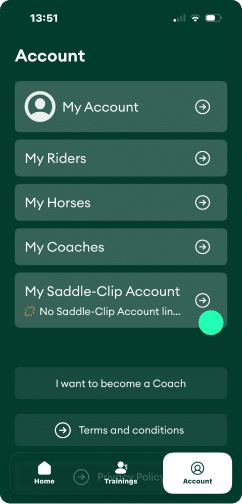
Open the Coach-Copilot app and navigate to the account settings using the tab at the bottom of your screen.
Go to the My Saddle-Clip account menu to set up the connection.
Enter the email address and password of your Equestic Saddle-Clip account to authorize the Coach-Copilot app to access your Saddle-Clip rides data.
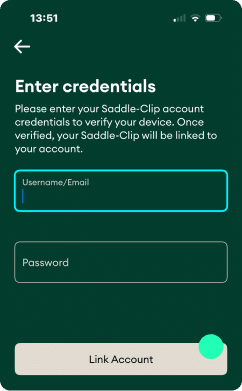
Click Link account. If your details are correct, your username will appear, confirming the connection.

When accepting an invitation for the next lesson, you will have the option to choose whether to use Saddle-Clip data for this ride.
How to Link your Saddle-Clip Account
Quick guide for Coach-Copilot App Users
Open Coach-Copilot
Open the Coach-Copilot app and navigate to the account settings using the tab at the bottom of your screen.
Go to the My Saddle-Clip account menu to set up the connection.
Enter the email address and password of your Equestic Saddle-Clip account to authorize the Coach-Copilot app to access your Saddle-Clip rides data.
Click Link account. If your details are correct, your username will appear, confirming the connection.
When accepting an invitation for the next lesson, you will have the option to choose whether to use Saddle-Clip data for this ride.
